 VidMedia
Saving a video is easier when browsing and downloading happen in one place.
You are looking through a recipe site, then a tutorial site, then a travel guide. Each time you want to save something, switching between a browser and a downloader breaks the flow.
The friction of switching apps
Most people do not start with a download task. They start by browsing. The need to save a video appears only after they find something worth keeping.
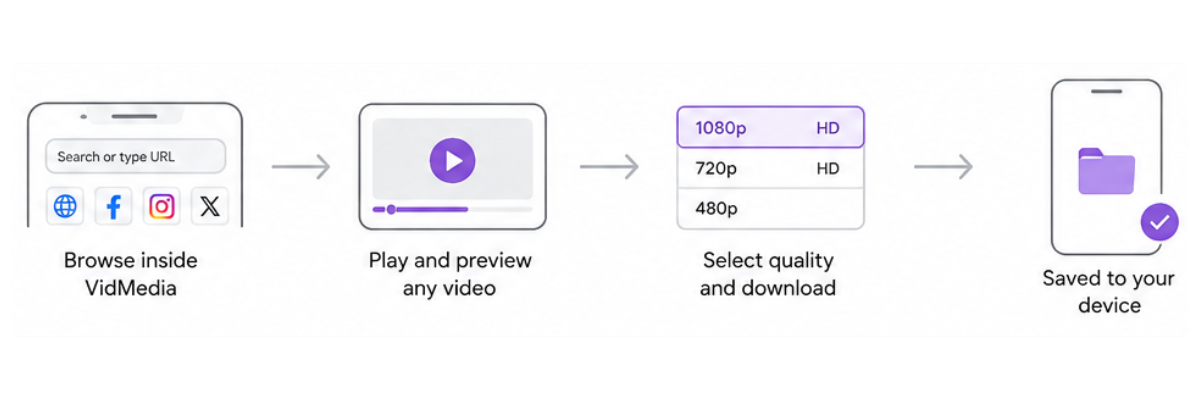
A built-in browser reduces the back-and-forth. Users can navigate supported websites and start the download process without leaving the app every few seconds.
- Browse supported websites inside the app.
- Reduce app switching.
- Move from preview to download more directly.
Solution
VidMedia's built-in browser gives users a single place to find supported videos, review them, and begin saving them for offline viewing.
That keeps the app focused. It is still a lightweight Android video downloader, but the browsing step feels connected to the download step.
Feature highlights
Integrated browsing
Navigate supported websites without leaving VidMedia.
Download options
Choose from available quality options where supported.
Organized files
Use the download manager to track saved videos.
Practical benefits
The main benefit is continuity. A built-in browser helps users move from discovery to offline viewing without repeatedly switching tools.
The interface should support the way people already browse, not force them into a separate workflow.
Frequently asked questions
Why use a built-in browser?
It lets you browse supported websites and start downloads without constantly switching between different apps.
Can I browse before downloading?
Yes. You can browse supported content first and begin downloading from within the same experience.
Does the browser replace my regular browser?
No. It simply provides a convenient browsing option inside the app for supported download workflows.
Is it useful for everyday browsing?
Its primary purpose is to simplify browsing and downloading supported videos within the app.
Ready to keep important videos available offline?
Download VidMedia from Google Play and manage supported video downloads with a clean, organized interface.