
Responsible Video Saving
Guides for saving, organizing, and understanding video files
VidMedia.Live combines a browser utility with practical guides for creators, educators, and everyday users who need to keep lawful copies of their own videos, Creative Commons media, public domain footage, and content they have permission to save.
Latest practical guides
Original articles about archiving, licensing, formats, and responsible workflows.
A Responsible Video Downloading Checklist
8 min read · August 20, 2026
Building a Personal Media Library That Will Still Make Sense Years Later
8 min read · August 17, 2026
How to Audit Old Video Posts Before Reusing Them
8 min read · August 14, 2026
Video Consent for Events, Schools, and Community Groups
8 min read · August 11, 2026
Downloading vs Embedding Video in Blogs and Newsletters
8 min read · August 8, 2026
How to Save Video Evidence Responsibly
8 min read · August 5, 2026
Android app preview
A cleaner mobile workflow is on the way
The upcoming VidMedia Android app is designed to make everyday media organization feel simple on a phone. Watch the short walkthrough to see the core flow, layout, and mobile-first experience before it arrives on Google Play.
Simple steps
A guided flow that stays clear on small screens.
Focused design
Clean controls with less visual clutter.
Coming soon
Built for Android users who prefer an app experience.
Use VidMedia.Live responsibly and only with media you own, have permission to save, or are otherwise allowed to keep for personal reference.
What This Tool Is For
VidMedia.Live is a browser-based utility for saving video files you already have the right to keep. Maybe you uploaded something to a social platform and want a local copy before you delete your account. Maybe you found a video released under a Creative Commons license or in the public domain and want to add it to your personal archive. Or maybe you are a creator backing up your own work so you do not lose years of content if a platform changes its policies.
This is not a tool for copying content you do not own, bypassing paywalls, or working around access controls. It is built for the straightforward use case of saving publicly available media that you are entitled to keep. Past that, it handles the technical work. You paste a link, review the available quality options, and save the file in a format your device can open.
We built this because we believe people should be able to keep copies of the content they create and the openly licensed material they find. Internet access is not always reliable. Platforms shut down. Accounts get locked. Having a local copy of something you care about is a simple form of digital ownership that should not require technical expertise.
How Does It Work?
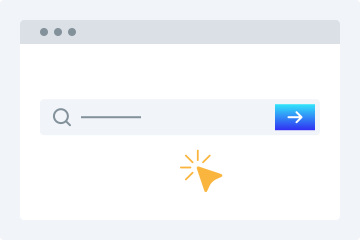
1. Enter URL
Copy the video URL and paste it into the field above.
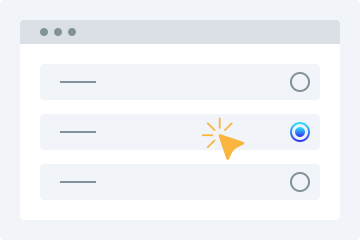
2. Select Quality
Pick your preferred resolution or format from the options.
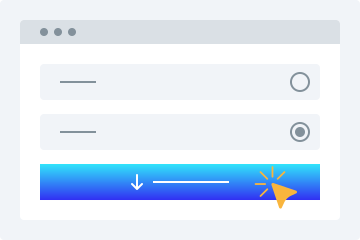
3. Download
Click download and the file saves straight to your device.
The process is intentionally simple because the complexity happens behind the scenes. When you paste a link, the tool identifies which supported platform the video comes from and checks what formats and resolutions are available for that specific file. Different platforms encode video differently. Some offer a single compressed stream, while others make multiple quality tiers accessible. The tool presents what is actually available, letting you decide between a smaller file for mobile storage or a higher resolution for archival purposes. Once you choose, the file is served directly to your browser for download. Nothing is stored on our servers long-term.
Choosing the Right Quality and Format
When you save a video, you typically see options like 360p, 480p, 720p, 1080p, and sometimes higher. These numbers refer to the vertical pixel count of the video frame. Higher numbers mean more detail, but they also mean bigger files. A 10-minute video at 1080p might be around 300 to 500 megabytes, while the same video at 360p could be under 100 megabytes. The right choice depends on what you plan to do with the file.
For watching on a phone or tablet, 720p is often a sweet spot. It looks sharp on small screens and keeps file sizes reasonable. For archiving something you care about, like your own original footage, picking the highest resolution available makes more sense because storage is cheap and you cannot add detail back later. For quick reference clips or content you will watch once and discard, a lower resolution saves space and downloads faster.
Format matters too. MP4 is the most universally compatible container, working on every device and operating system without additional software. Some platforms offer additional format options, but MP4 is the safest bet for long-term accessibility. If you only need the audio from a video, many downloads also offer an MP3 extraction option, which strips the video track and delivers just the sound at a fraction of the file size.
This utility lets you save publicly available videos you have the right to download. It is a simple, no-fuss way to grab media from supported platforms. Here are the features you can expect.
Simple Interface
Clean and intuitive. Paste a link to eligible content, choose your quality, and save it to your device in moments.
Multiple Quality Options
Pick from various resolution levels when saving a video — from 360p all the way up to 4K where available. Select what suits you and download.
Works on Any Device
This browser-based utility runs on any device. Desktop, tablet, or phone. No app installs needed.
Video Preview
See a playable preview before you download. Confirm it is the right file before committing.
No Installation Required
No software, plugins, or extensions needed. Just a browser and an internet connection.
Downloading Made Simple
Here is why people choose this tool for their media-saving needs.
No Sign-Up Required
Unlike many downloaders, this one does not ask for registration. Paste a link and download — no account needed.
One Tool for All Your Legitimate Downloads
Stop jumping between tools. Whether saving your own content or publicly shared clips, this handles it all from one place.
Fast Results
Advanced processing delivers your file quickly. Paste, pick, and download in moments.
Offline Access
Save publicly available content to watch anytime, anywhere — no internet connection required.
Why Use This Tool?
Compatible Across Platforms
Accepts publicly available video URLs from leading social networks and streaming services — great for backing up your uploads, preserving public announcements, or accessing open-licensed material you're permitted to save.
Zero Software Setup
Operates completely inside your browser. Nothing to download, install, or keep updated. Functions on Windows, macOS, Linux, Android, and iOS — no compatibility headaches.
Your Privacy Matters
Standard downloads don't require an account. Submitted URLs are handled momentarily and never kept long-term. We don't monitor your activity or pass your information to third parties.
Quick Results, Flexible Formats
Gets your file ready in moments. Choose from lower resolutions like 360p and 480p all the way up to 720p, 1080p, and 4K when supported. Audio-only MP3 extraction is also available.
Built for Legal Use
Platforms that explicitly forbid downloading are off-limits. Our service is intended solely for saving your original content and publicly accessible media where you hold the rights to keep a copy.
Frequently Asked Questions
What kind of video content can I save with this tool?
You can save videos you created yourself and uploaded to supported platforms, content released under a Creative Commons license, public domain material where copyright has expired, and videos where the rights holder has explicitly authorized downloading. The tool is designed for content you have the right to keep a copy of. If you are unsure about a specific video, check the license or permissions on the original source before downloading.
Will the quality of the saved file match the original?
The quality you get depends on what the source platform makes available. Most platforms encode videos at multiple resolution levels. When you paste a link, the tool shows you which of those levels are accessible. Choosing the highest available option gives you the best quality the platform offers for that file. Keep in mind that platforms often compress uploaded videos, so the source file on the platform may already be lower quality than what you originally created.
Do I need to install anything to use this?
No. VidMedia.Live works entirely in your browser. There is no software to download, no browser extension to add, and no account to create. It runs on any device with a modern browser and an internet connection. This includes Windows, Mac, Linux, Android, and iOS.
Is there a cost to use the basic features?
The core tool is free. You can paste links and download videos without paying or registering. There is a premium tier that offers faster processing, priority queue placement, and download history tracking, but the basic functionality has no cost. Rate limits apply to free use to ensure fair access for everyone.
What happens to my data or the links I paste in?
Submitted URLs are processed on the fly to fetch the video and are not permanently stored. We do not keep copies of the videos you download. Standard downloads do not require an account, and we do not track or log your activity beyond basic analytics that help us improve the service. For full details, see our privacy policy.
Can I use this on my phone as well as my computer?
Yes. The tool works in any mobile browser just as it does on desktop. Open Safari on iPhone, Chrome on Android, or any other modern browser, visit the site, paste a link, and download. No app is needed. On iOS, downloaded files go to the Files app by default, and you can move them from there.
What file formats are available when saving?
Videos are delivered as MP4 files, which is the most widely compatible format across devices and operating systems. If the source supports it, audio-only extraction as MP3 is also available. This is useful for saving podcasts, lectures, or any content where you only need the sound track.
What should I do if a download does not work?
First, check that the video URL is correct and the video is still publicly accessible in your browser. If the video has been removed, set to private, or is behind a login wall, the tool will not be able to access it. Some platforms also change their URL formats or add restrictions that can temporarily affect processing. If you are sure the video is public and accessible, try again after a few minutes. If the problem persists, the source platform may have introduced new restrictions that we need to address.